


Create a Google Shared Drive

Feb 18, 2026
 0
0
A shared drive is an organizational structure within Google Drive that lives parallel to My Drive. Shared drives support files owned by an organization rather than an individual user. An individual file may be organized within a shared drive or My Drive, but not both. Using shared drives will allow SCORE volunteers to collaborate within their chapter or across chapters nationwide.
How to Create a Shared Drive
- Create a Shared Drive on [email protected] by adding a Shared Drive (in Drive). It looks like a folder.
- In order to copy the original shared drive most effectively, without lots of work, download the whole drive (from the topmost folder) to your computer. (Depending on its size and your download speed, it will arrive after 20 or so minutes, zipped. )
- Right click on the Zipped file and click to unzip it.
- Drag and drop from your computer to the new shared drive. Go down a level and highlight all the folders and files and drag and dropped them into the shared folder. This should take about two minutes. The upload will take as much (or more than) three hours, but you can let it run in the background.
- Once done, you will be able to share the whole thing with one or more member and make them a manager. You can have many members.
- From their individual SVO, they can create a member with access to another folder only. They will be listed as a content manager (there are other access titles). Be aware that they can send a link to another (anyone) for that folder. If they don't want them to be able to edit, the access type of the link can be managed:
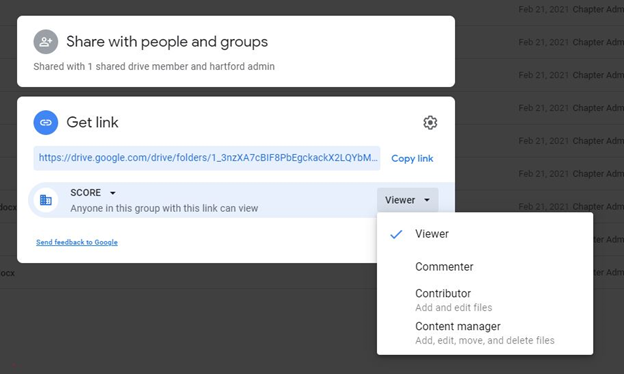
7. You can give access to a Group alias the same way you would any individual member, so that anyone in the Group has the same permissions.

